Showing posts with label Oracle. Show all posts

Friday, 2 September 2011

Oracle BI Server Features

OBI Server is not mere SQL Generator:


SQL is generated by Oracle BI Server against the data sources using the data source connection, information from the repository, and database-specific parameters stored in a DBFeatures.ini file. Thus, Oracle BI Server is not just a SQL generator. It determines the best source and the optimal way to access data. In some cases, Oracle BI Server takes on operations that are more efficient for it to perform rather than the host data source.


View the original article here

Alerts for the Oracle BI Delivers

Alerts for the Oracle BI Delivers :

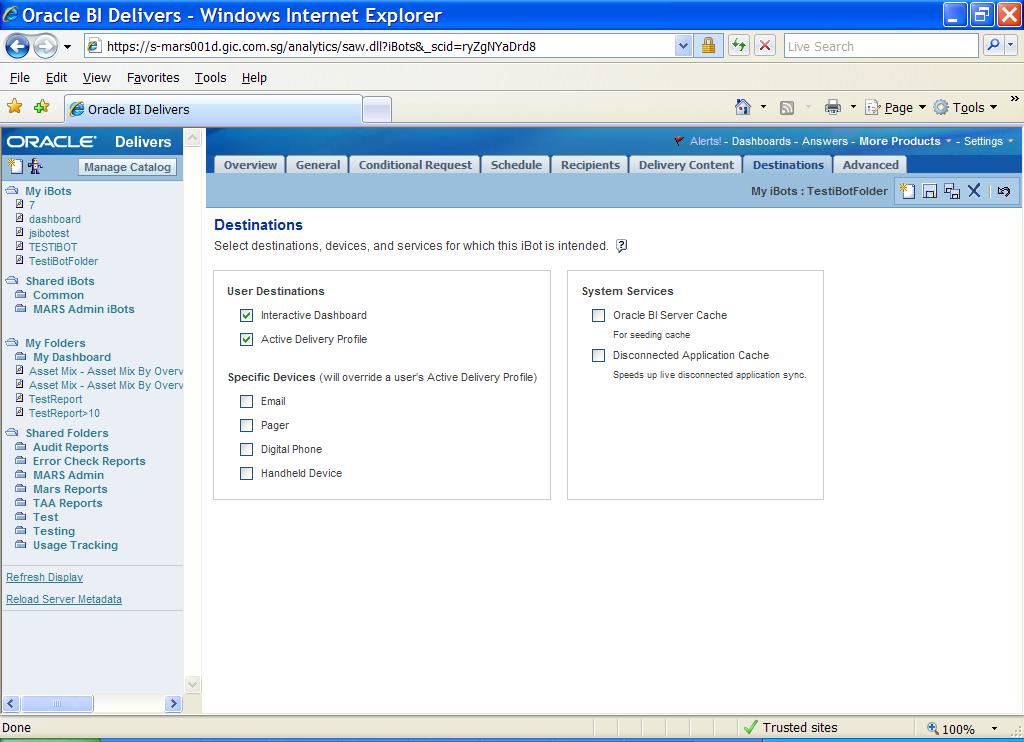
This is about creating alerts for OBI delivers.

Go to Destination Tab – > Check Interactive Dashboard. It is very simple.

Interactive Dashboard

Active iBots will appear in a Dashboard Alerts section as well as on the Alerts! page. A link to this summary appears together with the application navigation links when new iBots are delivered. After these are cleared on the Alerts page, the alert link is removed.

Be the first to like this post.This entry was posted on April 14, 2011 at 9:36 am and is filed under OBI Delivers. You can follow any responses to this entry through the RSS 2.0 feed. You can leave a response, or trackback from your own site.

View the original article here


View the original article here

Wednesday, 24 August 2011

Oracle Business Intelligence 11g

Logical Architecture


Oracle Business Intelligence Logical Architecture


Description of Figure 3-1 follows


The Oracle Business Intelligence domain contains three main components: a WebLogic domain, Oracle Business Intelligence System Components, and a database. Each main component is represented in its own rectangle contained within the Oracle Business Intelligence Domain rectangle. The Database component rectangle contains only a database, however the WebLogic domain and Oracle Business Intelligence System Components rectangles contain several subcomponents each.


A typical Oracle Business Intelligence installation consists of a Fusion Middleware home and the following subdirectories:


wlserver_10.3: The WebLogic Server home, which contains Java components, one Administration Server, and one or more Managed Servers.


oracle_home: The Oracle Home contains binary and library files for Oracle BI.


oracle_common: The Oracle Common Home contains the binary and library files required for Fusion Middleware Control and Java Required Files (JRF). There can be only one Oracle Common home within each Middleware home.


Typical Oracle Business Intelligence Directory Structure on a Single host with default values. At the top of the directory structure is the Middleware Home, which contains the Product Oracle Home, the Oracle Common Home, and the WebLogic Home. Notice the domains and instance directories are de-coupled from the MW_HOME and ORACLE_HOME.


Description of Figure 3-2 follows


Ref: Oracle Business Intelligence documentation


View the original article here